Feb 17, 2026 /Mpelembe media/ — Google DeepMind has introduced Lyria 3, a sophisticated artificial intelligence model designed for high-fidelity music generation. This technology allows users to transform text prompts or uploaded images into cohesive audio tracks with natural rhythmic flow. Creators can exercise technical control over specific details, such as vocal styles, linguistic nuances, and acoustic arrangements, to produce professional-grade compositions. To ensure ethical use, the developers integrated SynthID watermarking to identify AI-generated content and worked alongside musicians to establish creative guardrails. Beyond music, the broader ecosystem features specialized tools for scientific research, robotic reasoning, and environmental mapping. Consistent with its mission, the organization emphasizes responsible AI development that enhances human productivity and artistic expression.
Lyria transforms images into custom musical tracks through a process rooted in Multimodal Diffusion Transformers (MMDiT) architecture, which allows the AI to “see” a visual input and translate it into corresponding acoustic textures and structures.
Here is how the transformation process works technically and practically:
1. Unified Token Space (MMDiT Architecture)
The core of Lyria 3’s ability to convert images to music is its MMDiT architecture. Unlike older models that might require separate processing stages, Lyria treats disparate data types—such as image pixels and audio spectrogram patches—as unified tokens within a shared transformer backbone. This allows the model to operate in a shared “embedding space” where visual and auditory concepts are linked.
- Visual-to-Audio Mapping: The model analyzes the visual composition of an image to determine the musical “mood” and “density”.
- Texture Translation: Specific visual traits trigger corresponding audio characteristics. For instance, the model might interpret a stark, high-contrast architectural photo as a cue for sharp transients and minimalist electronic textures, whereas a warm, blurred sunset would lead the generation toward ambient, low-pass filtered soundscapes.
2. Latent Synthesis and Diffusion
Once the visual tokens are mapped to the shared space, Lyria uses a diffusion process to generate the audio.
- The model starts with Gaussian noise and progressively “denoises” it into a complex audio waveform, guided by the visual tokens from the uploaded image.
- This process is mathematically governed by Rectified Flow (RF) formulations, which allow the model to efficiently generate high-fidelity, 48kHz stereo audio clips in approximately 10 to 20 seconds.
3. Integration with Gemini
For the end user, this technology is accessible directly through the Gemini app.
- Workflow: Users simply upload an image (or video) and can optionally add a text prompt to further refine the output.
- Output: The model generates a 30-second track that matches the mood of the visual content.
- Lyrical Content: Lyria 3 can also generate lyrics and vocals that align with the visual context. For example, providing photos of a dog can prompt the model to compose a song specifically about that dog and its adventures.
4. Safety and Provenance
To ensure transparency, every track generated from an image includes an imperceptible SynthID watermark embedded directly into the audio waveform. This watermark survives compression (like MP3 conversion) and noise, allowing tools to identify that the music was AI-generated from visual prompts.
Musicians can collaborate with Lyria 3 through several distinct interfaces and workflows that range from casual ideation to professional studio production and live performance. Unlike earlier models that functioned primarily as “jukeboxes” (input prompt, output file), Lyria 3 is designed as a “musical modeling clay” that allows for real-time steering and integration into existing creative stacks.
Here are the primary ways musicians can collaborate with Lyria 3:
1. Direct DAW Integration (The Infinite Crate)
For professional producers, the most significant collaboration method is through “The Infinite Crate,” a VST plugin that bridges the gap between browser-based AI and local production environments like Ableton Live, Logic Pro, or FL Studio.
- Workflow: Instead of generating a full song and importing it, producers can run Lyria RealTime directly inside their Digital Audio Workstation (DAW).
- Application: This allows musicians to generate infinite loops, evolving textures, or backing tracks that can be sampled, chopped, and processed in real-time alongside traditional instruments. It essentially treats the AI as a virtual band member or an infinite sample library.
2. Real-Time Performance and Improvisation (MusicFX DJ)
Developed in collaboration with six-time Grammy winner Jacob Collier, the MusicFX DJ tool transforms Lyria into a live performance instrument designed to facilitate a “flow state”.
- Dynamic Steering: Rather than waiting for a track to generate, musicians can “conduct” the music live. Controls allow users to adjust “density,” “brightness,” and speed on the fly, or mute specific instrument groups (like removing bass or drums) to create breakdowns and drops.
- Prompt Mixing: Performers can blend conflicting concepts—such as mixing “70s Funk” with “Cyberpunk Ambience”—and hear the model morph between them instantly.
- Sonic Modeling Clay: This approach allows musicians to treat audio as a malleable substance, sculpting the intensity and texture of the soundscape in real-time.
3. Iterative Composition (Music AI Sandbox)
The Music AI Sandbox offers a suite of tools for songwriters to refine compositions iteratively rather than generating them in one shot.
- Extend: Musicians can upload an existing audio clip (or a generated one) and ask Lyria to generate a continuation, which is useful for overcoming writer’s block or reimagining where a melody could go.
- Edit and Transform: The “Edit” feature allows for targeted modifications, such as changing the genre or mood of a specific section, or transforming audio inputs (like a hummed melody) into full instrumental parts using text prompts.
4. Multimodal Inspiration (Gemini App)
Within the Gemini app, Lyria 3 functions as a multimodal brainstorming partner.
- Visual-to-Audio: Musicians can upload images or videos to generate a soundtrack that matches the visual mood. For example, a video clip can be uploaded to generate a synchronized rhythmic backing, or a photo can prompt a specific textural atmosphere.
- Lyrical Integration: The model can generate lyrics and vocals simultaneously based on the visual or textual context, allowing songwriters to quickly prototype vocal melodies and lyrical themes.
5. The “Hybrid” Professional Workflow
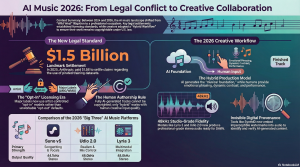
Due to current copyright laws, which generally deny protection to fully AI-generated works, professional composers are adopting a “Hybrid Production” model using tools like Lyria.
- Seed Generation: Musicians use Lyria to generate rhythmic foundations, harmonic “seeds,” or specific instrumental stems.
- Human Layering: These AI-generated elements are then imported into a DAW where the composer adds human performance layers, rearranges the structure, and mixes the track. This level of human intervention is often necessary to qualify for copyright ownership.
- Stem Separation: Users can extract specific stems (up to 12 tracks in some advanced configurations) to isolate a specific AI-generated element—like a unique synth sound or a drum loop—while discarding the rest.
6. Multimedia Filmmaking
Through partnerships with platforms like Invideo, filmmakers and scorers can use Lyria 3 alongside video generation models (Veo) to create synchronized soundtracks for films. This allows composers to test the “soul” of a scene by rapidly generating scores that align with visual pacing before committing to a final composition.
Using AI music on YouTube involves navigating a complex landscape of copyright laws, platform policies, and evolving licensing agreements. While the technology has moved into a “Licensed Model Era” following major settlements in 2025, significant legal risks remain for content creators.
1. Lack of Copyright Protection (Public Domain Risk)
The most fundamental legal risk is that you do not own the music you generate.
- Public Domain: The US Copyright Office has definitively ruled that 100% AI-generated content cannot be copyrighted. It falls into the public domain.
- No Exclusivity: Because you cannot copyright the track, you have no legal recourse if a competitor copies your brand’s theme music, re-uploads your soundtrack, or claims it as their own.
- The “Hybrid” Loophole: To claim copyright ownership, you must demonstrate “sufficient expressive elements” of human authorship. Professional composers are now using “Hybrid Workflows”—exporting AI stems (isolated tracks) and manually layering human performances or significantly rearranging them in a DAW (Digital Audio Workstation) to qualify for copyright protection.
2. YouTube Content ID and Copyright Strikes
Even if you have a license from an AI platform, YouTube’s automated systems present operational risks.
- False Positives: AI models often generate outputs that sound similar to existing copyrighted material or other AI-generated tracks. This can trigger YouTube’s Content ID system, leading to demonetization or copyright claims.
- Third-Party Registration: Because users cannot copyright raw AI tracks, bad actors sometimes register AI-generated output with Content ID services. If you generate a similar track using the same prompt/seed, you may receive a copyright claim or strike from these third parties, potentially freezing your revenue or suspending your channel.
- Mandatory Disclosure: YouTube updated its policies in July 2025 to address AI content. Creators must disclose synthetic content; failure to do so can result in limited reach, blocked monetization, or takedowns.
3. Infringement Liability and “Radioactive” Back Catalogs
While major platforms like Suno and Udio settled lawsuits with record labels (UMG, Sony, Warner) in late 2025, the legal status of content generated before these deals remains murky.
- Training Data Disputes: The major labels sued AI companies for “willful copyright infringement on an almost unimaginable scale” for training on unlicensed songs. While settlements now allow for “opt-in” licensing, there is a risk that courts could eventually rule that training on copyrighted data without permission is infringement.
- The “Bag Holder” Risk: If an AI platform shuts down due to legal pressure or fails to secure necessary licenses, the legal provenance of the music you generated becomes unclear. Creators may be left “holding the bag,” possessing content that platforms no longer want to host due to legal ambiguity.
- Deepfakes and Right of Publicity: Using AI to mimic a specific artist’s voice or style (e.g., “in the style of Taylor Swift”) creates a high risk of legal action for violating “Right of Publicity” laws. Major labels actively issue takedowns for “sound-alike” content, as seen in the viral Drake/The Weeknd AI track incident.
4. Licensing Traps (Free vs. Paid Tiers)
Understanding the specific license you hold is critical to avoiding breach of contract or copyright strikes.
- Non-Commercial Free Tiers: Most generators (e.g., Suno, Udio) strictly prohibit commercial use on their free tiers. Using a free-tier track on a monetized YouTube channel is a violation of terms and can lead to legal issues.
- Attribution Requirements: Many free or lower-tier plans require you to credit the AI platform. Failing to do so is a breach of license.
- Indemnification: Paid “Pro” subscriptions often include indemnification, meaning the platform agrees to legally protect you if a rightsholder sues you for using their output. Free users generally do not receive this protection.
Summary of Best Practices for YouTube Creators
To mitigate these risks in 2026:
- Use Paid Subscriptions: This ensures you have a commercial license and often includes legal indemnification.
- Choose “Ethical” Generators: Platforms like Beatoven.ai and Soundraw are “Fairly Trained” or use proprietary data, significantly reducing the risk of copyright infringement claims from major labels.
- Modify the Output: Do not upload raw AI files. Add voiceovers, edit the structure, or layer in other sounds to create a “derivative work” that is safer from automated Content ID flags.
- Avoid Artist Prompts: Never use an artist’s name in your prompt to avoid “sound-alike” liability.