
Not Quite MSFS 2024, But Free: Exploring Google Earth’s Experimental Flight Mode
Mon, Jun 15 2026 /Mpelembe Media/ — On June 12, 2026, Google launched an experimental, web-based flight simulator directly within the Google Earth browser application. This transitions a beloved feature—which existed for nearly two decades as a hidden “Easter egg” in the downloadable desktop client—into a highly accessible, zero-installation browser utility.
Key Features and Mechanics:
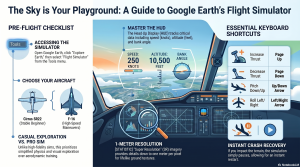
- Accessibility: Users can launch the simulator directly from the “Tools” menu on the Google Earth website without needing external plugins or large local downloads.
- Gameplay and Controls: Players can pilot two types of aircraft: the beginner-friendly Cirrus SR22 propeller plane, or the high-speed F-16 Fighting Falcon. The simulator uses keyboard and mouse controls and features a Heads-Up Display (HUD) that projects telemetry like speed, altitude, pitch, and heading.
- Focus on Exploration: Unlike high-fidelity aviation systems such as Microsoft Flight Simulator 2024, Google’s simulator utilizes simplified flight physics. It is designed for casual, motion-based geographical exploration rather than rigorous aerodynamic training. It also features a forgiving crash recovery system that simply pauses the game and lets the user restart at a safe altitude.
- Dynamic Streaming: The simulator streams Google’s 3D photogrammetry and high-resolution satellite imagery on demand.
Limitations: Because it relies entirely on cloud-streamed data and browser rendering, the simulator is heavily dependent on the user’s internet bandwidth. Flying at extreme speeds or on a slow connection can result in rendering delays, blurry terrain, and 3D buildings popping in late. Furthermore, the web version currently lacks the multiplayer capabilities, live airspace traffic, and advanced atmospheric physics found in platforms like GeoFS or Microsoft Flight Simulator.
The Sky is No Longer a Download Away: Why Google Earth’s “Map Flying” is the Most Relatable Game of 2026
For years, the ritual of opening Google Earth has followed a predictable, almost universal path: the “idle journey.” You search for your current apartment, then your childhood street, then perhaps the specific roof of a high school you haven’t stepped inside in a decade. It is a process of inspection—a productivity tool that inevitably drifts into a toy.That transition is now official. On June 12, 2026, Google migrated its long-hidden flight simulator from the “easter egg” menus of its desktop Pro application directly into the web browser. This isn’t a play for the hardcore flight sim community; it is the transformation of a mapping tool into a global-scale curiosity engine. By moving the feature to the web, Google has effectively turned the planet from a “globe you inspect into a globe you inhabit.”
The 20-Year-Old Secret is Finally Out
For two decades, the flight simulator was a beloved oddity tucked away in the Google Earth desktop software, requiring a specific download and a “secret” keyboard shortcut to access. By bringing it to the browser, Google has performed an act of “distribution as a feature.”In 2026, accessibility is the real killer app. This version requires no 100GB-class install, no visit to the Microsoft Store or Game Pass, and no Steam account. It bypasses the friction of modern gaming entirely. You don’t need a high-end GPU that sounds like it is “spooling for takeoff” just to see your neighborhood from 2,000 feet; you just need a URL and a stable connection.
Flying a Map vs. Simulating Aviation
To understand why this is trending, one must recognize the “Simulator Paradox.” While Microsoft sells “aviation as a system”—an intricate web of procedures, checklists, and stubborn physics—Google is selling “motion through place.”In the Google Earth simulator, the location is the star, not the cockpit. The flight physics are intentionally simplified because the goal is casual exploration rather than high-fidelity aerodynamic training. You won’t find realistic stalls or complex engine failures here. Instead, the mechanics are stripped down to a “flight metaphor”:
- Choice of Craft: Beginners can opt for the SR22 for a slower, more controlled glide, while skilled pilots can take the F-16 to climb straight up into the stratosphere.
- The Controls: Unlike arcade flyers, there is no WASD support. Thrust is managed via Page Up and Page Down , while the Arrow Keys handle banking and turns.
- Forgiveness: If you make direct impact with the terrain, the simulation simply pauses. A single click of “Restart” restores you to a safe altitude, ready to fly again.
The Browser is the Real Cockpit
The technical achievement here lies in the “handshake between client, network, and cloud.” Utilizing WebGL and the 3D Tiles API, the simulator streams 3D buildings and high-resolution imagery in real time. However, this virtualization of global space is entirely dependent on your graphics pipeline. If your bandwidth lags, the illusion breaks: textures soften, and buildings “pop” into existence as you outrun the map.This creates a new, unintended headache for IT administrators. Because it is “web-only,” the simulator creates a heavy graphics and bandwidth workload in managed office or school environments. Admins who traditionally block Steam or traditional games now find the boundary blurred; a tool once used for geography class has suddenly become a high-performance entertainment engine that bypasses standard gaming blocks.Even within this global virtualization, the “real world” occasionally glitches. Google’s developers have noted “terrain anomalies” in regions below sea level, such as Badwater Basin in California , where flying near ground level can result in occasional flashing or clipping—a reminder that we are, after all, flying through a database.
The “Fly Over Your House” Phenomenon
The real “hook” of browser-based map flying isn’t the thrill of aerodynamics; it’s the emotional gravity of the familiar. Fernando Miguel Amaral, the creator of the experimental WorldFlightSim project, noted that the most common user behavior is rarely searching for major international airports. Instead, it’s typing in a home address and performing a “low pass over the roof.””That reaction is worth more than any feature,” Fernando observed. Users aren’t just flying; they are taking screenshots of their own homes from a pilot’s perspective to send to family members. This personal connection turns a technical update into a human story. The stakes are non-existent, but the “emotional stickiness” of seeing your own slice of the world is a hook that even the most expensive professional simulators struggle to replicate.
The HUD: Learning the Language of the Skies
While the experience is casual, the interface utilizes a standard Head-Up Display (HUD) to help you navigate. To see the world clearly, you can toggle this overlay on and off.
- Speed: Your current velocity in knots.
- Vertical Speed: Your rate of ascent or descent in feet per minute.
- Pitch Angle: The angle (in degrees) between your aircraft’s nose and the horizon.
- Bank Angle: The arc in the center showing how far you are tilting during a turn.
- Control Box: A visual indicator in the lower-left corner showing the current positions of your throttle, rudder, aileron, and elevator.Pro-Tip: Press H to toggle the HUD and the Spacebar to pause the simulation. Be warned: the simulator uses inverted mouse controls. Clicking inside the sim enables mouse-guided flight, where moving the mouse down toward the bottom of your screen pitches the nose up .
Conclusion: The Virtualized World
As global imagery platforms evolve, the line between a map and an interactive environment continues to evaporate. Google Earth’s browser-based simulator is a reminder that once you have photorealistic 3D data of the entire planet, adding movement is the only logical next step.Microsoft may still own the cockpit, but Google has reminded everyone that it owns the window seat. As every map becomes a potential playground, it raises a new question for our digital culture: If we can now inhabit and “fly” through our own neighborhoods with a single click, how does that change the way we perceive the world we actually live in?