
The AI Brain Meets the Real World: A Guide to Function Calling
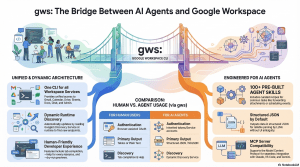
March 8, 2026 /Mpelembe Media/ — The provided sources describe the emergence of AI agents designed to automate productivity tasks within the Google Workspace ecosystem. A central development is the release of gws, an open-source command-line interface that unifies various Google APIs into a single, machine-readable format. This tool allows large language models to interact directly with Gmail, Calendar, and Drive by providing structured JSON outputs and pre-built agent skills. Technical tutorials illustrate how developers can use the Vercel AI SDK and Model Context Protocol (MCP) to build assistants capable of managing schedules and conducting web searches. Furthermore, the integration of the Gemini CLI with tools like Google Sheets highlights a shift toward natural language data automation. Together, these resources mark a transition from manual API management to autonomous agentic workflows powered by generative AI.
1. Introduction: The Limitation of a “Brain in a Box”
Imagine a genius locked in a soundproof room with no windows or doors. This person is incredibly knowledgeable and can write beautiful poetry or solve theoretical physics equations, but they cannot tell you what the weather is like outside right now, and they certainly cannot go to the store for you. This is a standard Large Language Model (LLM)—a “brain in a box.”
An AI Agent, however, is that same genius equipped with a smartphone and a set of keys. Based on current technical standards, an AI Agent is an intelligent software program that uses generative AI models to interact with users and autonomously perform tasks. The primary mechanism that turns a static model into a dynamic agent is a process called function calling.
Text Generators vs. Real-World Agents
| Feature | Text Generators (Standard LLM) | Real-World Agents (with Function Calling) |
| Primary Goal | Generating human-like text responses. | Autonomously performing specific tasks. |
| Knowledge | Limited to the data it was trained on. | Accesses live, real-time information via tools. |
| Interaction | Conversation only. | Interacts with external APIs and applications. |
| Example | Writing a poem about a calendar. | Actually adding a meeting to your Google Calendar. |
To bridge the gap between “knowing” and “doing,” the AI model uses function calling to communicate its intent to the outside world in a language computers can execute.
——————————————————————————–
2. The Mental Model: Brains, Hands, and Toolbelts
To understand how an agent functions, it helps to use a simple anatomical analogy:
- The Brain (The LLM): This is the core reasoning engine (such as Meta’s Llama 3.1 or Google’s Gemini). Its role is to recognize intent and reason through a plan. It doesn’t actually “know” how to browse the web or edit a spreadsheet; it only knows how to think and decide which action is necessary.
- The Toolbelt (Functions): This is a predefined list of what the agent is allowed to do. Each tool has a specific name (like webSearch) and a set of instructions (metadata) telling the brain exactly what information it needs to collect from the user to use it.
- The Hands (Execution): These are the actual computer commands or API calls. Once the “Brain” decides which tool to use, the “Hands” perform the physical action of sending data to an external application, like Google Calendar or a search engine.
For the brain to use its hands, it needs a specific, unambiguous language to describe its intent—this is where Function Calling serves as the vital connective tissue.
——————————————————————————–
3. Anatomy of a Function Call: From Words to Code
Function Calling is the capability of an AI model to recognize when a user’s request requires a specific tool and then identify the correct arguments (the specific details) needed to run that tool.
The LLM does not execute the code itself. Instead, it translates “fuzzy” human language into a JSON (JavaScript Object Notation) object. This is a critical step because JSON provides a structured format that prevents the ambiguity of human speech or the errors that often derail graphical user interfaces. It ensures the communication between the Brain and the Hands is error-proof.
Consider the “Dinner Date” request from August 2024:
User Input: “Schedule a dinner date for this Saturday at 6 pm.”
The Brain’s Logic:
- Identify the Tool: The model recognizes this as a calendar task and selects the createCalendarEvent tool.
- Extract Arguments: It sifts through the text to find the title (“Dinner Date”) and the specific time (“Saturday at 6 pm”).
- Format Parameters: It maps the natural language to structured parameters. It converts the vague “Saturday” into a precise ISO 8601 string or a standard yyyy-MM-dd HH:mm format.
- Translation: The final output is a structured instruction: createCalendarEvent(summary=”Dinner Date”, startTime=”2024-08-31 18:00″).
——————————————————————————–
4. Case Study: The Calendar Assistant in Action
When a user asks, “Tell me my schedule for this week,” the AI agent performs a “roundtrip” process to move from a question to a real-world answer.
Note for Developers: In the FriendliAI framework, the agent must adhere to prerequisite logic; specifically, it must gain permission before it can act.
- Step 0: Authorization: The model identifies that it needs to access private data. It first calls authorizeCalendarAccess to securely log into the Google Account via OAuth.
- Recognition: Once authorized, the model identifies that the user is asking for information stored in Google Calendar.
- Selection: It searches its “Toolbelt” and picks the fetchCalendarEvents tool.
- Arguments: It performs the heavy lifting of converting “this week” into specific parameters, such as a startDate and endDate formatted exactly as yyyy-MM-dd.
- Action: The system runs the command, reaching out to the API to pull data (e.g., “Lunch date on Thursday, August 29, 2024”).
- Reporting: The LLM receives the raw data back and translates it into plain English: “You have a lunch date scheduled for Thursday at 1:00 PM.”
——————————————————————————–
5. Exploring the Agent’s Toolbox
As we move into the era of advanced AI, tools like the Google Workspace CLI (gws)—released in March 2026—have revolutionized how agents work. Unlike older tools with static lists of commands, gws is dynamic: it reads Google’s Discovery Service at runtime to build its command surface. This “secret sauce” ensures that whenever Google adds a new feature, the AI agent can use it immediately without needing a code update.
| Tool Name | What it does (Simplified) | Real-World “Hand” Action |
| webSearch | Searches the internet. | Queries DuckDuckGo for live info. |
| authorizeCalendarAccess | Gets permission (Required First). | Logs into a Google Account safely. |
| fetchCalendarEvents | Looks at your time. | Pulls events from Google Calendar. |
| gws drive files list | Scans your documents. | Searches Google Drive for specific files. |
| createCalendarEvent | Adds a new plan. | Writes a new entry into the calendar. |
——————————————————————————–
6. Conclusion: The “So What?” for the Aspiring Developer
Function calling is the technology that allows AI to move from being a chatbot to being a truly productive assistant. By mastering this mechanism, you are learning how to give an AI “agency”—the power to act on its own reasoning.
The three most important benefits of function calling are:
- Beyond Static Knowledge: It allows the AI to access live, real-time data (like current weather or 2026 travel schedules) that was never part of its original training data.
- Structured Accuracy: By using JSON and specific parameters, agents eliminate the “hallucinations” of text generators. They communicate with surgical precision.
- Autonomous Action: It enables “agentic workflows” where the AI moves from “telling” to “doing,” performing tasks across Gmail, Drive, and Sheets without you ever having to click a button.
As you build your first agent, remember: the magic isn’t just in how much the “Brain” knows, but in how skillfully it uses its “Hands” to navigate the real world. Happy coding!