
Dec. 25, 2025 /Mpelembe Media/ — Chrome Enterprise Premium is a specialized web browser solution designed to enhance corporate security through a Zero Trust architecture. By acting as a central enforcement point, it provides businesses with advanced threat protection against malware, phishing, and malicious websites. The platform features robust data loss prevention tools that allow administrators to restrict sensitive actions like uploading, printing, or downloading on various devices. It simplifies endpoint management by offering real-time visibility and context-aware access controls without requiring complex software installations. Ultimately, this service enables IT teams to secure a modern workforce while maintaining high levels of productivity and seamless integration with existing tools.
Chrome Enterprise Premium implements Zero Trust principles by transforming the browser into a centralised enforcement point for security, privacy, and control across an entire network. This approach recognises that the browser is now the primary platform for modern work, where employees access tools and manage workflows.
The following key features demonstrate how it applies Zero Trust to secure a digital workforce:
Context-Aware Access Control: The platform implements a fundamental Zero Trust tenet by fully authenticating, authorising, and encrypting all access attempts to enterprise resources. These decisions are based on the specific device state and user credentials, ensuring that trust is never assumed.
Uniform Security Across Devices: It provides a consistent security layer regardless of the hardware used. This includes both managed and unmanaged devices, such as Bring Your Own Device (BYOD) environments, ensuring that remote or flexible workforces remain protected.
Continuous Monitoring and Threat Prevention: Instead of relying on a secure perimeter, Chrome Enterprise Premium uses real-time URL and file scanning to defend against malware and phishing. This prevents users from accessing malicious sites or downloading suspicious files at the moment of interaction.
Granular Data Loss Prevention (DLP): To protect sensitive information, IT teams can selectively apply rules at the browser layer to block actions like downloading, uploading, printing, or saving. This helps prevent both accidental and intentional data exfiltration, even on unmanaged devices.
Adaptive Policy Management and Visibility: Security teams can “dial up” protections for high-risk users while maintaining productivity for others. The platform provides deep visibility into high-risk users, domains, and data protection alerts, offering a record of every file or data point that triggers a security rule.
Centralised Fleet Management: By managing the browser fleet centrally, organisations can ensure that time-sensitive updates and patches are applied across all devices and operating systems, closing vulnerabilities that attackers might exploit.
For instance, think of Chrome Enterprise Premium as a highly skilled digital security guard standing at the entrance of every single room (application) in your office. Instead of just checking an ID badge at the front front gate of the building and letting you roam free, this guard re-verifies who you are and checks the safety of your equipment every time you try to enter a new room or touch a sensitive file.
Chrome Enterprise Premium prevents accidental data exfiltration by acting as a centralised enforcement point for security policies directly within the browser, ensuring that sensitive information remains within the organisation’s control.
It employs the following specific mechanisms to stop data from leaving the organisation unintentionally:
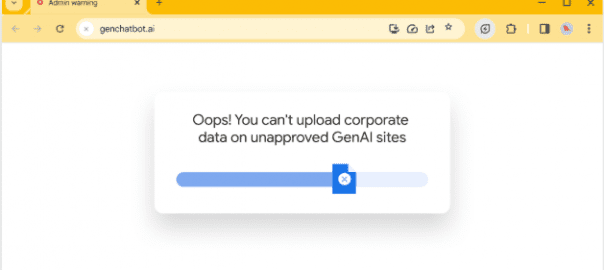
Granular Data Loss Prevention (DLP) Controls: Security teams can selectively apply rules at the browser layer to block specific actions, such as downloading, uploading, printing, or saving company data. This prevents a user from accidentally uploading a sensitive file to a personal cloud storage site or printing a document that contains protected information.
Real-Time File Scanning: The platform performs real-time file and URL scanning to identify and block the movement of suspicious or sensitive files before the transfer is completed.
Uniform Protection Across All Devices: These DLP protections are not limited to corporate hardware; they provide a uniform layer of security for both managed and unmanaged devices, including Bring Your Own Device (BYOD) environments. This ensures that an employee working from a personal laptop is subject to the same data safety standards as one in the office.
Context-Aware Access: Access attempts to enterprise resources are fully authenticated, authorised, and encrypted based on the specific state of the device and the user’s credentials. This ensures data is only handled in environments that meet the organisation’s security requirements.
Deep Visibility and Reporting: IT teams have access to advanced security insights, providing a clear record of every file or data point that triggers a security rule. This allows them to identify which users or domains are transferring the most sensitive data and address potential risks before they lead to a breach.
Adaptive Policy Management: Administrators can “dial up” protections for high-risk users or sensitive domains while maintaining the productivity of low-risk users, ensuring that the strictest guardrails are in place where they are needed most.
To understand this better, imagine Chrome Enterprise Premium as a smart filter installed on every tap in a building. Instead of just monitoring the main water line, this filter can recognise if you are trying to fill a bottle with “company-secret tea” and will automatically stop the flow before a single drop is wasted or poured into the wrong container, regardless of which tap you use.
Chrome Enterprise Premium supports a Zero Trust security architecture by transforming the browser into a centralised enforcement point for security, privacy, and control across an entire network. This approach addresses the vulnerabilities of the browser, which has become the primary platform for modern work where employees access tools and manage workflows.
The platform implements Zero Trust through the following key mechanisms:
Context-Aware Access Control: A fundamental pillar of Zero Trust is to never assume trust. Chrome Enterprise Premium fully authenticates, authorises, and encrypts all access attempts to enterprise resources. These decisions are made dynamically based on the user’s credentials and the specific state of the device they are using.
Uniform Security for All Devices: It provides a consistent security layer across the entire workforce, regardless of whether they are using managed hardware or personal equipment in Bring Your Own Device (BYOD) environments. This ensures that unmanaged devices are subject to the same rigorous security controls as corporate-owned ones.
Granular Data Loss Prevention (DLP): To prevent data exfiltration, security teams can selectively apply rules at the browser layer. This includes blocking specific actions such as downloading, uploading, printing, or saving sensitive information, especially on unmanaged devices.
Integrated Threat Protection: The browser acts as an additional enforcement point for malware, phishing, and malicious URL defences. It uses real-time scanning of URLs and files to prevent users from interacting with suspicious content or visiting malicious sites.
Adaptive Policy Management: Administrators can manage hundreds of policies centrally without the need for additional agents. This allows them to “dial up” the level of protection for high-risk users while maintaining productivity for low-risk users.
Deep Visibility and Insights: The platform provides security teams with advanced insights into high-risk users, domains, and data protection alerts. It maintains a record of files and data that triggered security rules, which supports remediation efforts and compliance reporting.
Centralised Fleet Management: By managing the browser fleet centrally, IT teams can ensure that time-sensitive updates and patches are applied across all devices and operating systems, closing potential security gaps.
To help understand this architecture, imagine Chrome Enterprise Premium as a highly sophisticated security gatehouse positioned at the only entrance to a private facility. Rather than just checking a visitor’s ID at the perimeter fence and letting them roam freely, this gatehouse re-verifies the visitor’s identity and inspects the safety of their vehicle every single time they try to move between different buildings or access sensitive files, ensuring no one is trusted by default.
Using Chrome Enterprise Premium, IT and security teams can selectively apply rules at the browser layer to restrict several specific actions, particularly to prevent data exfiltration and mitigate threats.
The actions that can be restricted include:
Downloading: Preventing users from pulling files or data from the web or internal applications onto their devices.
Uploading: Blocking the transfer of sensitive information from a device to external websites or cloud services.
Printing: Restricting the ability to create physical or digital printouts of sensitive documents.
Saving: Preventing users from saving company data locally to their browser or device.
Visiting Malicious Sites: Real-time URL scanning can be used to prevent users from accessing known or suspicious malicious websites.
Downloading Suspicious Files: Beyond general download restrictions, the system can specifically target and block files identified as suspicious through real-time scanning.
Accessing Enterprise Resources: IT teams can restrict or allow access attempts to specific company resources based on context-aware factors, such as the user’s credentials and the current state of their device.
These restrictions can be applied uniformly across both managed and unmanaged devices, ensuring that security policies remain consistent even in Bring Your Own Device (BYOD) environments.
Think of these browser rules as a smart digital filter attached to a multi-function office machine. Just as a business might disable the “scan to USB” or “colour print” functions for certain staff to save costs or protect secrets, Chrome Enterprise Premium allows an organisation to turn off specific digital functions like “upload” or “save” depending on who is using the browser and what they are trying to do.
Chrome Enterprise Premium utilizes real-time scanning capabilities to provide a robust defence against several specific digital threats:
Malware: The browser acts as an enforcement point to block the entry of malicious software into the network.
Phishing: It identifies and defends against deceptive attempts to steal sensitive user information.
Malicious URLs: Real-time scanning prevents users from visiting known malicious sites that could compromise their device or credentials.
Suspicious Files: The system scans files in real-time to prevent users from downloading potentially dangerous content.
Data Exfiltration: By scanning files and data against established security rules, it helps prevent both accidental and intentional leaking of company information.
These capabilities ensure that the workforce is protected across managed and unmanaged devices, including Bring Your Own Device (BYOD) environments, by providing a uniform layer of security control.
To visualise this, imagine a security screening point at an airport. Instead of just checking your passport once at the entrance, a digital officer scans every bag (file) you try to bring in and checks every destination (URL) you try to fly to in real-time, stopping dangerous items or prohibited travel the moment they are detected.
Download Get integrated threat and data protection with Chrome Enterprise Premium