The Aspiring Learner’s Guide to AI Infrastructure: GPUs and Cloud Economics
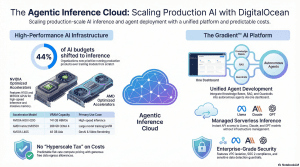
The provided sources detail DigitalOcean’s comprehensive expansion into the artificial intelligence sector, transforming into an “Agentic Inference Cloud” tailored for AI-native businesses, developers, and startups. Following its acquisition of Paperspace, DigitalOcean has built a unified ecosystem that bridges affordable, high-performance GPU infrastructure with advanced tools for building and deploying AI agents.
Welcome to the Engine Room: Why GPUs Matter
Welcome to the heart of the AI revolution. If you’ve spent any time prompting OpenAI’s GPT-5.3-Codex or building with Claude Sonnet 4.6 , you’ve seen the magic. But behind that magic is a massive “engine room” of hardware.In the early days of AI, the focus was on training —teaching a model how to think. Today, the world has moved into the era of inference : putting those models to work to generate predictions and power real-world applications. This shift is so massive that many companies now spend 100% of their AI budget just on inference. However, a recent 2026 study showed that 49% of developers identify the high cost of inference as their #1 blocker to scaling. To succeed today, you don’t just need to be a good coder; you need to understand the economics of the “stadiums” you’re renting.Teacher’s Note: Think of a standard computer brain (the CPU) as a brilliant university professor who can solve one incredibly complex problem at a time. A GPU, on the other hand, is like a massive stadium filled with 10,000 smart high school students. They might not solve a PhD-level thesis individually, but they can all solve a simple math problem at the exact same moment. This “massive parallel processing” is what allows AI to “think” at the speed of light.This guide will help you navigate the heavy hardware titans of 2026 and the cloud strategies that keep you from running out of lunch money before your model is finished.
The Heavyweights: Comparing A100, H100, and AMD Instinct
When you look at a cloud provider’s menu, the sheer number of GPU models can feel like alphabet soup. The key is to look at the VRAM (Video RAM) and the Architecture .In the 2026 landscape, the “So What?” comes down to a concept called Model Splitting . Imagine you have a massive model like DeepSeek-R1 or Llama 3.3 (70B) . If that model requires 100GB of memory but your GPU only has 80GB, the system has to “cut the model in half” and put it on two different chips. The time it takes for those two chips to “talk” to each other creates the lag that users hate. This is why VRAM capacity is often more important than raw speed.| GPU Model | Key Strength | Best For (Student Use Case) || —— | —— | —— || NVIDIA RTX 4000 Ada | Budget-friendly (20GB VRAM). | Small experiments or learning to build basic AI Agents. || NVIDIA H100 | 80GB VRAM; Hopper architecture. | Training mid-sized models 4x faster than the older A100. || NVIDIA H200 | 141GB VRAM; high-speed HBM3e. | High-speed inference for models like GPT-5.3-Codex . || AMD Instinct MI325X | Massive 256GB VRAM capacity. | Running 100B+ parameter models without “model splitting.” || AMD Instinct MI350X | 288GB VRAM; CDNA 4 architecture. | Massive inference throughput and high token generation speed. |
The Professional Insight: While NVIDIA is the household name, AMD’s MI series has become a 2026 favorite because that massive memory allows you to host complex models on a single node, slashing your interconnect bottlenecks.
The “Sticker Price” Trap: Understanding Cloud Pricing Logic
When you see a GPU for $1.50 an hour, don’t reach for your credit card just yet. In professional circles, we talk about the Total Cost of Ownership (TCO) . Often, there is an “AWS Ecosystem Tax” —hidden fees that can make a “cheap” instance more expensive than a premium one.Factor these four hidden costs into your budget:
- CPU and RAM Bundling: Many providers lure you in with a low GPU price but charge extra for the “supporting cast.” A $1.50/hr GPU might require $0.50/hr worth of CPU and RAM just to function.
- Data Transfer (Egress): Moving data into the cloud is free. Moving your results out can cost up to $0.09 per GB . If you are generating high-res video or massive datasets, this “tax” can ruin your unit economics.
- Storage Fees: You pay for the space your model occupies on the “hard drive” 24/7, even when the GPU is turned off.
- Reliability Costs: If a bargain-bin provider crashes during hour 9 of a 10-hour training run, you didn’t save money—you wasted 9 hours of rent.
4. On-Demand vs. Spot Instances: The Reliability Gamble
Choosing a rental type is like choosing between a reserved hotel room and flying “standby.”
- Definition: Guaranteed access at a fixed, advertised price.
- Primary Benefit: It is yours until you turn it off. Total peace of mind.
- Primary Drawback: It is the most expensive way to access compute.
- Best For: Live production APIs and customer-facing agents.
- Definition: You are renting “leftover” capacity the provider hasn’t sold yet.
- Primary Benefit: Massive discounts, often 60% to 90% off standard rates.
- Primary Drawback: The provider can “reclaim” the GPU with as little as a 30-second warning.
- Best For: “Checkpointed” training where your code saves progress every few minutes.
Your Decision Framework: Choosing the Right Platform
As your skills grow, your infrastructure needs will change. Think of your journey as a three-phase narrative:
- Phase 1: Experimenting (The Budget Marketplace) If you’re just playing around, use a marketplace like VastAI . It’s essentially the “Airbnb for GPUs,” where individuals rent out their personal hardware. It’s the cheapest way to explore, but the reliability varies wildly.
- Phase 2: Training (The Developer-First Cloud) When you’re ready to build serious prototypes, look at DigitalOcean (formerly Paperspace) . They have spent a decade making complex hardware accessible through a “simplicity first” approach. With their Gradient™ AI Platform , you get transparent, predictable pricing without the “hyperscaler” learning curve.
- Phase 3: Deploying (The Production Pilot) When you graduate to production, you’ll need a pilot to navigate the storm—that’s where Northflank comes in. Only 23% of companies manage to stay on a single cloud provider; the rest struggle with the “management burden” of multiple tools. Northflank uses Auto Spot Orchestration to find the cheapest GPUs across AWS, Azure, and Google Cloud, handling failovers automatically if a Spot instance is reclaimed.
Summary Checklist for Success
Before you rent your first GPU, run through this final review. Treat it as your pre-flight check to ensure you aren’t flying into a budget storm.
- The “All-In” Check: Does the hourly rate include the CPU, RAM, and the required storage?
- The Egress Audit: Have I calculated the cost to download my trained model or generated data?
- The BYOC Check: Can I “Bring Your Own Cloud” and use existing AWS or Google credits on this platform?
- The Quota Hurdle: Does the provider require a “quota request” that might take days to approve for an H100?
- The Checkpoint Plan: If using Spot instances, is my code configured to save progress so I don’t lose money on a reclamation?
- The 2026 Model Check: Does the VRAM on this GPU (e.g., 20GB on an RTX 4000 Ada) actually fit the model I’m trying to run?Mastering these basics empowers you to build real-world AI applications that are both powerful and profitable. Happy building!